

Content Overview
Slice & Dice IT Challanges
Autopilot Vs Device Preperation
PatchMyPC
Intune Reporting – lets make it better
Become a Master Packager
Slice and Dice IT Challenges
(or how to deploy security features without breaking devices)

Rudy Ooms and Niklas Olsen ran a session to show how we can secure intune without breaking things. And if you do break things how to fix them. The challenges include enrolment failures, compliance issues, policy enforcement problems and admin rights misconfigurations
There is a fine balance between Security and productivity. We want our users to be productive, but in a way that is secure and doesn’t get in their way.
Enrolment Issues
- If MDM urls are missing, you can manually add via registry for any hybrid machines and this should force them to register with the tenant
- Use tools like Fiddler to capture HTTPS traffic to see what is occurring (or in the case of troubleshooting what is not happening!)
- With the MDM URL taken from the fiddler trace, you’ll be able to get the policy URL and then use Microsoft Graph to view the policies that the device should be getting
- Microsoft Graph will show ALL policies that apply to it, not just the ones that show in the UI. You can also use Graph to delete rouge enrollment policies.
Config refresh
This is a config that keeps device in the desired state that IT admins expect even if the device is offline
- Does not require Intune checkin (well, it needs an initial check-in to populate the cache)
- Refresh runs locally
- Obviously will not pick new configuration until it comes online and picks it up through an intune sync
- Only applied to PolicyCSP and Bitlocker configuration
- Implement via Intune setting and this adds a local ADMIN scheduled task to refresh the policy
When Microsoft release that new feature you have been waiting for, don’t immediately deploy it production. Put it into test to ensure it works and doesn’t have any bugs. For example, when Microsoft released “Administrator Protection” there was a bug which would cause a resource cache error loading the MUI file on sign in. This was only picked up after the initial release. You have been warned 🙂
Compliance Policies & Device Health Attestation
This ensures the health of the device and reports back to intune which you can block until it is remediated. However, for device Health attestation, a reboot after Autopilot is often needed to allow Bitlocker to report correctly. Its recommended to split the Device health attestation out into its own policy with a longer grace period.
Passwordless
Enable Web Sign on to allow passwordless authentication to take place, including TAP. But remember to checkout devicelock as this could break websign in
Some recommendations:
- Configure PIN reset feature so that users are able to reset their PIN from the lock screen.
- Don’t configure “Interactive Logon: Don’t display the last signed-in” as it prevent Windows Hello from working
- Don’t disable the password credential provider using the Exclude credential providers policy as:
- Disables passwords for all accounts including local accounts.
- Also prevents the use of passwords for RDP and Run As authentication
- Disable built in admin account and create your own one randomizing its password using LAPS
Wrap Up:
- Implement security features in deployment rings
- Don’t deploy stuff straight to production
- Misconfigurations lead to issues. Check settings are not conflicting
Autopilot vs Device Preparation
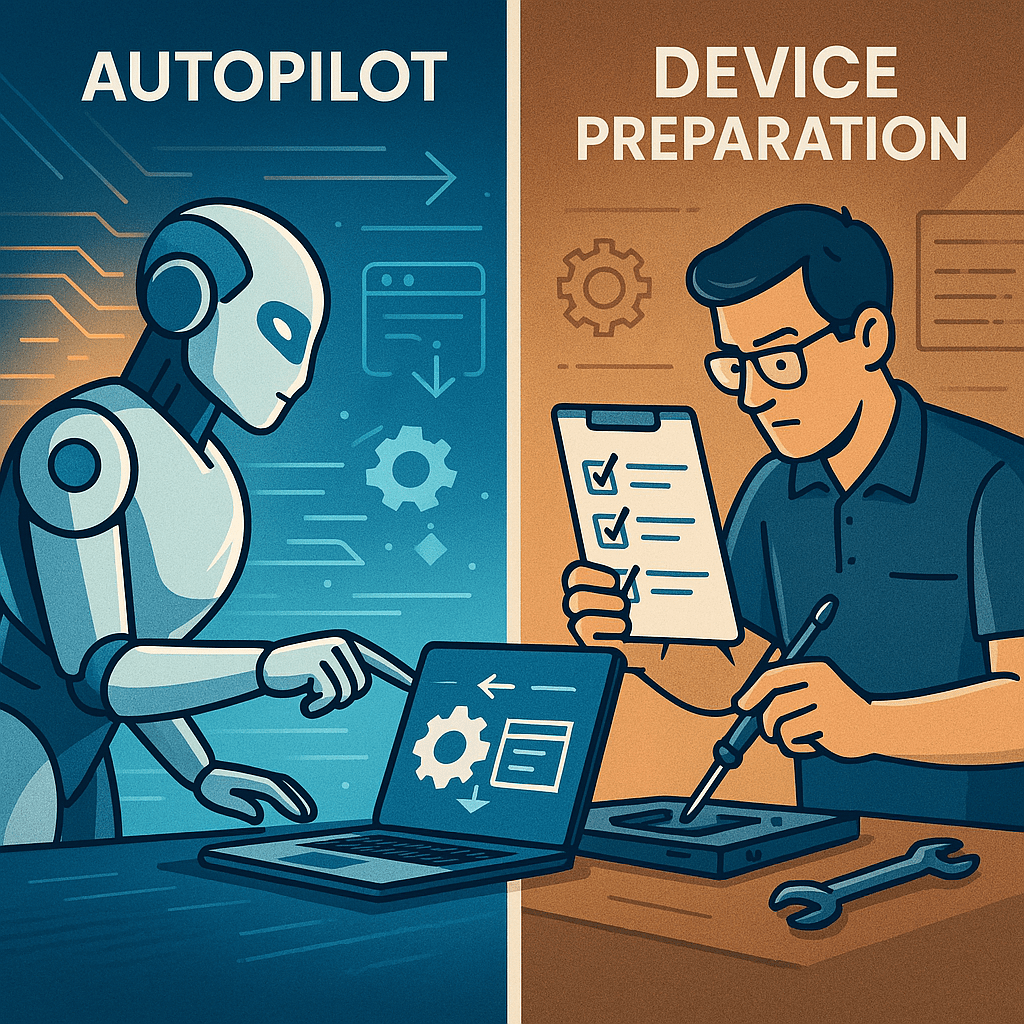
Johannes Geir Krisjansson and Steve Weiner started this session all about the differences between Autopilot and Device Preparation (aka Autopilot v2).
First an overview on how Autopilot currently works:
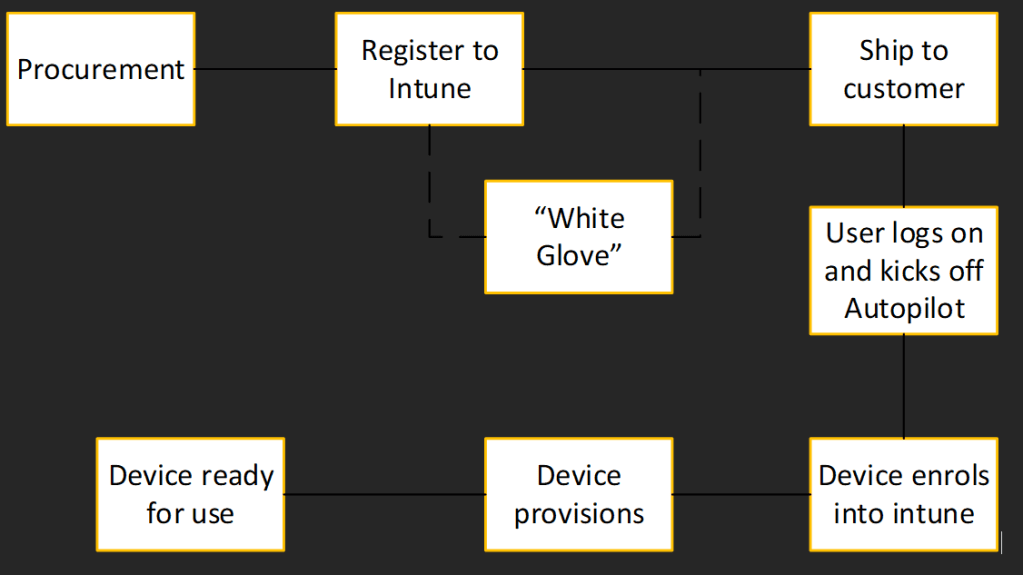
With Autopilot we can decide to block non-corporate devices from being added to the tenant thus securing our tenant to only corp owned devices.
Key recommendation is to keep your remediation scripts to a bare minimum otherwise there is an increased deployment and system startup each time as the device has to enumerate all the remediations.
7 years later….
| What worked? | What didn’t work |
| User Driven approach | Self registration (Hardware Hash) |
| Greatly reduced manual IT touch | Lots of moving parts (Intune / Enrollment profile // ESP) |
| Self-Deploy flow | Not easy if buying from other sources |
| Easy when procuring from OEM | Hybrid Join can be tricky |
| Streamlined OOBE |
Thus.. Device preparation was born!
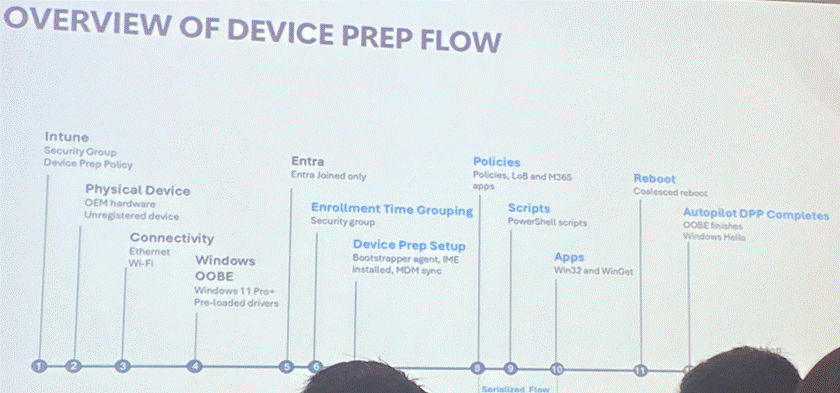
Now we are a year on… and it is it better?
| Whats Working? | What could be better? |
| Can be used in GCC High | 50/50 shot of users skipping it |
| Extremely easy to setup | OOBE cannot be customized |
| One configuration to deploy | Easy to accidently allow personal devices |
| Purchase devices from anywhere | Needs more details OOBE page |
| Process reporting improved |
So with Autopilot we had:
- Device based
- Group tags could determine device build
- Ie marketing user for a marketing device
Under device preparation, it’s a slightly different mindset
- Identity based
- User account determines build
- Ie Marketing users will get the correct setup
- Profile is assigned to user
- Maximum 10 blocking app or platform scripts allowed
- Shift mentality towards key 2 to 3 apps in device prep, and have all other applications come down once the device is prepped and ready to be used by the user
Consider this. We don’t get caught up on imaging a mobile device do we? Why do we with laptop devices? Take your thinking to a modern way of thinking for a more modern deployment.
We have those key apps that IT need (VPN, Office, AV/XDR) and then let the user sign on and self service to install the apps their way. If they can setup a mobile phone with their apps, they can on a modern deployment.
In device preparation, there are no hardware hashes. These only tied the motherboard to a particular tenant, which then causes issues if they motherboard is replaced and not removed from the tenant. In device preparation we use corporate identifier to identify that the device may belong to a tenant.
And it is the corporate identifier that allows the device to be able to provision itself without the need for allowing personal devices. In fact, as a long term strategy (discussed on day 2) we want to aim for all the sliders on the page to be at block. That’s secure!
And OEMs can help here by adding the corporate identifier to an Intune tenant.
So how do we setup Device Prep?
- From Intune portal, click Devices > Enrolement > Device Preperation > Create
- Provide Name and description
- Select a device group for the device to go into once its signed on
Note: Ensure that the Intune Autopilot Confidential Client app is an owner on this group - Select user group to apply the profile to
- Setup the configuration
- Deploy Mode: User-Driven
- Deployment Type: Single User
- Join: Entra (Note Device Prep only supports Entra Join)
- Account type – Not Admin
- Change “mins allowed before error” decrease this to 10 -15 mins. 60 mins is far to long.
- Select the apps/platform scripts that you want to be on the device and blocks access until this is done.
Now for the downsides.
- During OOBE, the user has to select Work/School account to go into device Prep. If they choose Personal its game over
- The user gets to choose the name of the device. Is this an issue as part of the mentality shift is we are more concerned with user then device and we can find the users device using their name.
Patch My PC – Intune reporting

Patch My PC (oh and MAC) is a patch management and application updating platform that automates the updating of 3rd party applications to devices. There are around 100-200 applications in their catalog.
Application Managment and updating
To deploy an app update, select the app and hit deploy and go through the wizard to assign and publish into intune and the previous version will be superseded
It is possible to upload custom apps and then publish these in the same way as app catalog updates occur.
One big feature is the Discovery. This can not only see what apps are installed on devices and highlight the ones that are published that need updating, but also those applications that are not published but installed from other sources and then can bring it under management and updating it.
It uses PowerShell App deployment toolkit v3.10 (v4 coming soon to the app) as a wrapper for the deployments and is fully customizable. PatchmyPC now have stewardship over the Powershell App Deployment toolkit and have committed to making this free and to keep adding features for the community to build application deployments.
Alongside the app and patch management, there is advance intune analytics which helps to surface data into a native dashboard to have an improved visibility of data. There is a small agent that can be installed onto devices to collect enhanved data but its not a requirement. It provides reporting on compliance and enhanced hardware inventory.
Also able to import and link to CVE insights to the relevant Microsoft knowledgebase articles. This is a separate iOS/Android free app, but the data can be brought into PatchMyPC and links to realtime vulnerability information in the environment.
Intune reporting

Thanks to Maurice Daly and David Brook for running a stimulating session on how great Intune reporting. Oh hold on… Intune reporting – not great eh? Ever looked at a report and wondered why the numbers do not match what your expecting? This is down to sometimes Intune includes counts for users and system or all users on device which then conflates the reporting. What else, oh you would think that all the reports live in the Intune portal under Reports. Well, get out from under that rock because they don’t. There are reports all over the portal and sub-reports under the selected report.
Lets throw some more negativity in for Intune reporting to say that there is a severe lack of consistency between the different reports in numbers, how it is reported and visuals.
There must be another way without the need of an expansive product on top of Intune?
Yes there is. It starts with Log Analytics. But what is Log Analytics?
Log Analytics is a tool in the Azure portal to edit and run log queries from data collected by Azure Monitor logs and interactively analyse their results. You can also use Log Analytic queries to retrieve records that match particular criteria, identify trends, analyse patterns and to provide various insights into your data.
But isn’t Log Analytics really expensive? It can be if you don’t control or limit the data coming in. in some cases it can be really cheap. Remember you can keep up to 735 days worth of data in one go, and then have up to 10 years in the archive. We can add constraints on the data ingestion to keep the controls under cost. And did you know that Log Analytic workspaces under 5gb is free? Sssh I didn’t tell you that.
With Log Analytics we can create dashboards based on requirements, join datasets and share workbooks with other colleagues, or the boss that asks questions. Now you can give him a URL to get self-serve the data himself!
Setting up Log Analytics for Intune is straight forward:
In the Intune portal:
- Firstly, seutp a log analytics workspace. This will be needed soon.
- Click Tenant Administration
- Diagnostic Settings and select the Log analytics workspace
Select the diagnostic settings to send to the workspace. These include:
- AuditLogs
- Who changed what where and how
- OperationLogs
- Background bits
- DeviceComplianceLogs
- Urm, device compliance logs
- Devices
- Detailed information on your enrolled devices
- Windows365AuditLogs
- Same as audit logs, but focused on Windows 365 instance
From our security-first mindset, we need to be mindful about:
- Avoid hardcoding credentials. Do not embed workspace ID or primary keys into code or script
- Use secure storage
- Implement RBAC to limit access to sensitive data
- Rotate the primary and secondary keys to minimize the risk of compromised credentials
- Monitor access to the workspace and review logs for unauthorized attempts.
Now. Learn KQL. This seems to be a theme in a few sessions I have gone to recently. I’ll be adding this to my learning plan to start the journey and I’ll share it here when I do this.
It is possible to write remediation scripts which collect additional information from devices and send this into Log Analytics to supplement the data that Intune already collects.
Ensure that the JSON you upload matches the schema in Intune. If you add a new data point in the script, the schema also needs to be updated to expect the new data point, otherwise it will be ignored and you’ll go around in circles troubleshooting why its not appearing.
Take all of your KQL queries and build this into a workbook that you can then use as a master view into the data and share with colleagues. You can then build visualisations and make a dashboard to share with mangers and c-suite types. You can also trigger alerts based on the data.
Become a master packager
Master Packager is a powerful application packaging tool designed to simplify the creation, editing, and deployment of Windows Installer (MSI) and Transform (MST) files.
It caters to IT professionals, software vendors, and managed service providers by offering a streamlined interface and robust feature set that reduces the complexity of software packaging. The software supports both repackaging of existing installations and the creation of new packages from scratch, making it ideal for customizing applications to fit specific enterprise environments
The software is available in several editions: Community, Pro, and Service Provider. The Community edition is free and includes essential tools like the Table Editor and Master Wrapper. The Pro edition, priced at €1499, adds advanced features such as the Master Packager Toolbox, Master Repackager, and MSIX support, along with offline functionality and priority support.
Licenses are per-user but can be installed on unlimited machines, and they include one year of maintenance with optional renewal.
Master Packager stands out for its user-friendly design and automation capabilities, which help reduce errors and save time during the packaging process.
It supports batch processing, predefined custom actions, and templates, enabling users to manage complex packaging tasks with minimal manual intervention. Whether you’re a freelancer, a small business, or a large enterprise, Master Packager offers scalable solutions to meet diverse software deployment needs
So thats an epic day 1 complete. Another epic day to come. And thats my job for tomorrow is to write up on notes on day 2 sessions. Afterwards i’ll do another post with my thoughts and priorities.
Then its onto EUC Forum Summer conference here in Edinburgh








 Lilys Dad
Leave a reply to Workplace Ninja UK 2025 Day 2 Part 2 – Lilys Dad Cancel reply