

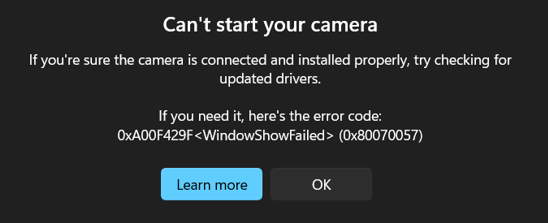
We recently encountered an issue with the camera on Lenovo devices suddenly stopping from working in Teams and other apps. In Teams and Windows Camera app we would get one of the two errors:
“Can’t start your camera. If you’re sure the camera is connected and installed properly, try checking for updated drivers. If you need it, here’s the error code: 0xA00F429F (0x80070057)”
“Camera is in use by another application”
After some investigation and data collection we started to realise that the trigger seemed to be the Sept 2025 update for Windows 11 23H2.
Further research shows we had this issue before and was fixed by disabling the Windows Camera Frame service, responsible for managing applications access to the camera.
We tried the regkeys to disable (as below), and yes this immediately fixed the issue. We tested on a few more devices and it started all working. So a rollout to users started.
HKEY_LOCAL_MACHINE\SOFTWARE\Microsoft\Windows Media Foundation\Platform
EnableFrameServerMode DWORD = 0.
HKEY_LOCAL_MACHINE\SOFTWARE\WOW6432Node\Microsoft\Windows Media Foundation\Platform
EnableFrameServerMode DWORD = 0.
One side affect with enabling the key, meant it broke the Windows Camera app, and according to Microsoft the reason for the crashing is that it relies on that service we disabled. Not an issue we thought, as you can test and set camera configuration elsewhere in Windows (settings, Lenovo Vantage app etc).
Roll on the next day, we started getting reports of Microsoft Teams now crashing looping. Excellent! Now was it down to the regfix we applied, or has Teams updated in its usual method?
Rolling back the fix on a few devices provided stability back to teams. So guess that Teams may rely on this service too.
Meanwhile, in the background our Microsoft support ticket bounced back and forth with suggestions (update camera drivers [urm… they are up to date]. update this, update that, rollback the update. We were still researching and stumbled across these posts on the Lenovo user forum, with exactly the same issue.
- https://forums.lenovo.com/t5/ThinkPad-L-R-and-SL-series-Laptops/Webcam-issues-L14-Gen-5-September-Patch-Tuesday/m-p/10003222
- https://forums.lenovo.com/t5/ThinkPad-T400-T500-and-newer-T-series-Laptops/Lenovo-T14-Gen-5-Camera-stops-working-after-Sept-2025-Microsoft-CU/m-p/10003154?page=1
We have also found posts linking to other hardware providers, showing it is not limited to just Lenovo.
Excellent we thought, its not a “us” thing. We were able to prove it was the September update by removing it from 2 IT devices and lo and behold the camera works.
Then we receive the confirmation, its a confirmed bug in the update, and Microsoft are working on a fix to be released in the October updates. Their advice, uninstall the update.
That’s an easy thing to do, rolling back 7000 odd devices and in the meantime making us uncompliant with our compliance! We are monitoring the situation on our next steps.
Root Cause
Now, this is my own theories from reading around on what release notes are available, plus investigations we have found during the troubleshooting.
We noticed, that if you logged in with Windows Hello, the camera would get locked in a process and never released. Terminating the Camera process, or restarting Windows Camera Frame Server service cleared the process and freed the camera up for use by the other applications.
There are several updates to Windows Hello in the September patch that could be at fault here. But it looks like theres an issue with it not releasing the camera to be available.
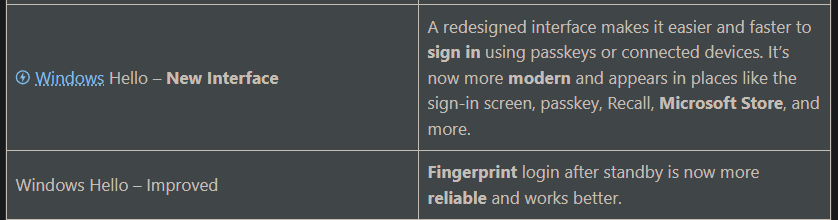

Source: https://www.anoopcnair.com/2025-september-kb5065426-kb5065431-windows-11/
Lets hope in October, it is fixed for all.In the meantime, we’re looking for a method to release a script that runs in system context we can then provide to our users to allow them to restart that Windows Camera Frame Server service without needing administrative credentials.
Will update this post with details if anything changes. Happy Thursday !





 Lilys Dad
Leave a comment