

Introduction
June 19 sees day 2 of Workplace Ninjas UK 2025 kick off in Edinburgh. Another early start so glad to grab a coffee and a pastry before the keynote kickoff. Slightly quieter today, but still a strong showing of attendees
Content
Microsoft Graph API Zero to Hero
Roadmap & AMA Windows 365 / Azure Virtual Desktop
Microsoft Graph API Zero to Hero

This session was about getting started with Microsoft Graph and hints and tips around it, hosted by William Francillete and Ru Campbell.
But what is Microsoft Graph? Well, its an interface that acts as a go between code you write and data stored in your Microsoft Products allowing you to read, write, update and delete.
There are two versions of Microsoft Graph, the v1.0 which is the production level endpoint and the Beta endpoint, which is the testing ground for any new Microsoft endpoint. Always target your production code towards v1.0.
There is full documentation on all Microsoft endpoints available in Microsoft Graph in the Microsoft Learn documentation.
Microsoft Graph API endpoints follow a structured URL format that allows developers to access and manipulate Microsoft 365 resources.
The base URL, https://graph.microsoft.com/v1.0/, is followed by an endpoint like users, which represents a collection of user objects. You can target a specific resource by appending a unique identifier, such as a user ID. Once the resource is specified, you can perform various actions using HTTP methods like GET (read), POST (create), PATCH (update), or DELETE (remove).
To refine the data returned, you can add query parameters such as $select, $filter, or $top to control which fields are retrieved and how many results are returned. This modular structure makes Microsoft Graph a powerful and flexible tool for accessing organizational data across Microsoft services.
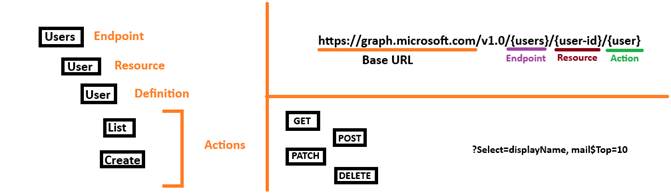
When deciding between a read action and a list action its good to remember the difference between them:
- Read – Get one user record
- List – Get all Users
With Microsoft Graph, the ideal situation is scoping the data that you want to return to ensure that the Microsoft Graph call is efficient. Why return all 10,000 users in the tenant, when you only want IS people. We can use scoping, or a $filter in Microsoft Graph language, to do this scoping. This performs the filtering on the server-side (aka Microsoft Graph) and the data is then delivered to you. The filter uses odata query parameters
$filter department -eq ‘Information Systems’With filtering, we can also use $Select to only return the properties we are really interested in.
How to get started with Microsoft Graph? Theres a few resources:
- Microsoft Graph Explorer
- Microsoft Learn documentation
- Use Microsoft Copilot to help get the right endpoint, the right filtering and property scoping and to understand how it all fits together
- Start with a small use case to begin with
- Test, test, test
- Get Postman to help with the testing
- Think securely. Lets not put our client secret for the App registration that has permissions into Microsoft Graph in clear text in code.
Top 10 Intune Must Knows
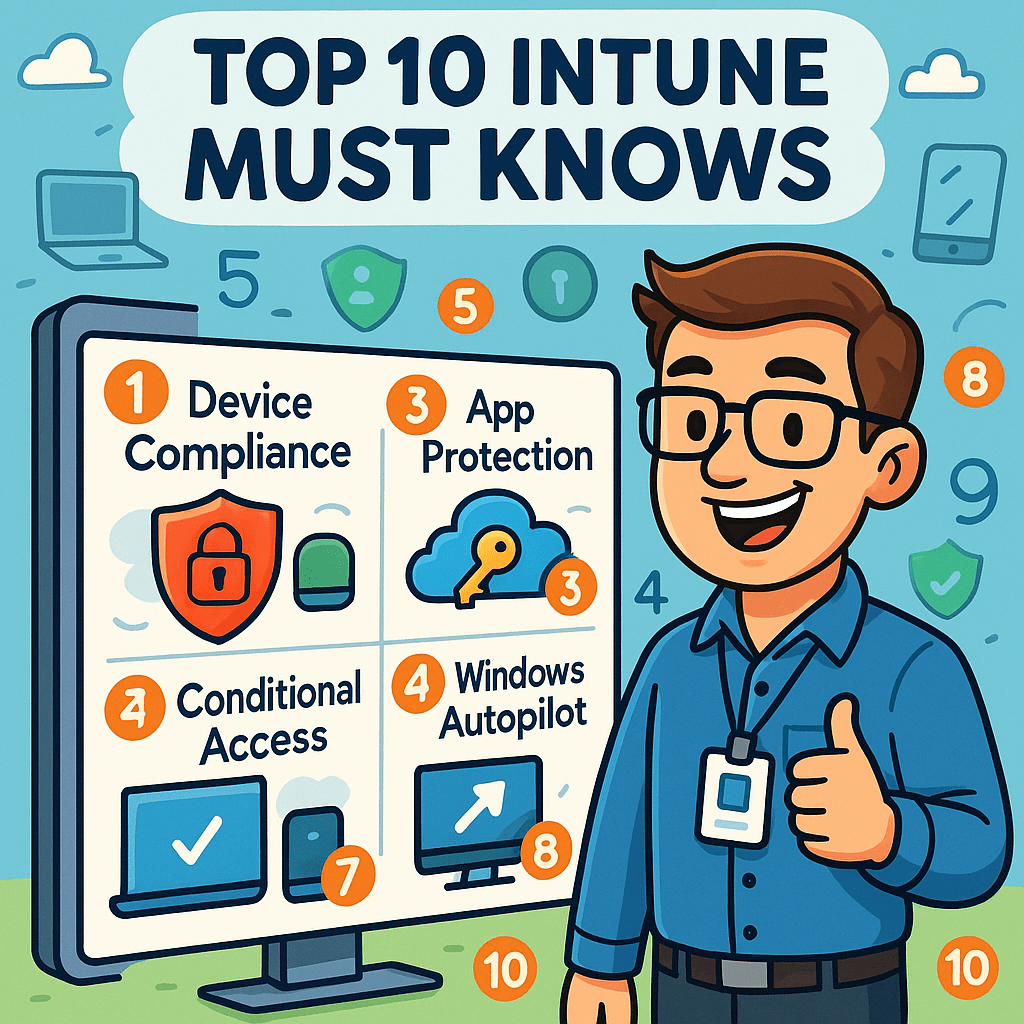
Jannik Reinhard and Nicklas Ahlberg ran a session to help out all of us Intune administrators with some best practices and useful tips
#1 Custom Intune Reporting
The inbuilt reporting of Intune is clunky, all over the place, no consistency and inflexible. The answer to this is Log Analytics and creating your own workbooks of queries and the ability to create your own reporting dashboards/
#2 Remediation
This provides the ability to identify and fix issues on Windows devices. Unfortunately, it can only be set on a schedule, rather than on an event driven process. But, could this come with a mix of Intune Advanced analytics (Intune suite – sorry) and Copilot?
#3 EPM Deny Rules [Intune Suite £££]
With Endpoint Privilage Management, we have the ability to white list an app so the user can self-elevate the permissions without interaction with IT Admins. We are also able to build in approval workflows for apps not on that list. But we are also now able to build deny rules which will auto deny if an IT admin never wants a user to request an elevation for a certain app or exe.
#4 Cross Platform Device inventory
Within Intune we are now able to collect device inventory information for Android, iOS and MacOS along with Windows. 24 apple, and 32 android data collection points have been added and data is updated every 7 days. Now we can get a clearer picture of the devices we manage in Intune.
#5 Device Query (aka Intune Advance Analytics) [Intune Suite £££]
Think of this as Cloud CMPivot for Intune. This is a product where we can query our estate in real time and have the ability to run actions based on the result of that data. Its based on KQL as a query language.
#6 New Icon [ yes it’s a stretch but its important ]
Yup, it’s a new Icon! Now we can tell the difference between being logged onto Intune or logged into Azure.
#7 Intune RBAC & Scope Tags
With Intune RBAC we can provide limited access to the Intune data without giving full admin access. From a “security first” point of view, using the Intune admin should be seen as last resort, but there are instances where it cannot be helped. This is a separate RBAC to Entra and Azure. It can be used for specific custom roles for example provide access to read Bitlocker Keys.
With Scope Tags, we can use these to help tie down the environment even more. If we want our IT Admins in London to only see UK devices and not those devices in Florida, we can use the Scope tag to do this in conjunction with RBAC rules.
#8 Keep track of changes in Intune
Intune development and improvements are constantly being added. Heres some tips on how to keep up to date with the changes in Intune:
- Check Intune documentation and Blogs
- Read the “Whats New” page in the Intune portal
- Create a webhoot RSS Feeds [ remember RSS feeds! ]
- Create a hook into blogs etc to bring in to a Teams Channel / Planner board
#9 Corporate Identifier & Platform Restriction
Thinking from a security-first perspective, we should be trying to set the Platform restrictions to Block so that only corporate devices are allowed to register. For mobile BYOD schemes this may not be possible.
With the introduction of Device Preperation it does not use the idea of Hash imported into the tenant to identify the device as corporate owned so would need to have the platform restriction set to Allow. However, Microsoft introduced the Corporate Identifier. An ID that can be used to identiy a device as being “owned” by a tenant.
#10 News for Android
Big one here, we now have the ability to provide a custom name for corporate owned Android devices. WOOP!
Roadmap & AMA Windows 365 / Azure Virtual Desktop

- RDP Multipath now in Public Preview
- Recommendations to migrate from Azure Network Connection to Microsoft Hosted Networks. Migration tool is in the works.
- Use Microsoft Hosted Networks & VPN to allow Windows 365 devices to get to On-Premise resources
Overview of Recent Windows 365 Feature Release
| User Experience | Security | Management |
| Windows App on all OS platforms | Passkey (FIDO2) authentication | Windows 365 Frontline Shared |
| Windows 365 Link | Windows App Token protection (Preview) | Utilisation insights |
| RDP Shortpath (UDP) | Purview Lockbox | |
| RSP Multipath (Preview) | Windows App MAM Support | |
| Windows 365 GPU and 16vCPU | Unidirectional clipboard control | |
| Call Redirection with MultiMedia Redirection (MMR) | ||
| New Teams engine for Virtual Desktop (Slimcore) |
Overview of Recent Azure Virtual Desktop Feature Release
| User Experience | Security | Management |
| Windows App on all OS platforms | Passkey (FIDO2) authentication | Windows 365 Frontline Shared |
| Windows 365 Link | Windows App Token protection (Preview) | Utilisation insights |
| RDP Shortpath (UDP) | Purview Lockbox | |
| RSP Multipath (Preview) | Windows App MAM Support | |
| Windows 365 GPU and 16vCPU | Unidirectional clipboard control | |
| Call Redirection with MultiMedia Redirection (MMR) | ||
| New Teams engine for Virtual Desktop (Slimcore) | ||
| Access OneDrive files in RemoteApp applications (Preview) |
App Deployment Brilliance

Anders Green ran through how we can get applications deployed, how to overcome headaches and challenges and a discussion around Powershell App Deployment Toolkit.
Push to Intune, make it the #1 place for users to go to get their applications. There are a number of options on how we can get an application into Intune for us to the deploy to our users
- Windows Store
- Line of Business
- Win32App
- Intune Enterprise App catalog [Intune Suite £££]
- 3rd Party tools like PatchMyPC and Robopack
- Scripting
So with a plathera of options to deploy our challenges normally boil down to the following:
- MSI or single EXE
- Updating apps and patching them
- Dependancies
- Conflicting versions of apps
- Apps that need interaction and those that don’t need it
- Configuring an application
Then we fight it out between Line of Business (MSI) or Win32 app
| Line of Business | Win32App |
| Easier to create and deployMinimal customizationFaster deploymentSmaller package sizeSimplier configurationEasier to manage | Allows for more complex and customized packagesSupport for wide variety of scenariosInclusion of Powershell scripts for detectionDetailed install status and error reportingSupport for wider range of appsAllows more interactive installs |
My conclusion and take away. Stay away from Line of Business apps. Win32App is the best way to deploy due to its flexibility. Even use it to wrap up a simple MSI for that advance reporting advantage.
An on top of those challenges, we get our headaches where an app needs:
- Specific extra files or configuration
- Setting folder permissions
- Adding in pre-requisites
- Allow user to interact with an admin based installation
Enter from stage left, Powershell App deployment toolkit. It’s a great, free and easy to use tool with a complete feature list. Its fully customizable to add log paths, icons, logos and banners
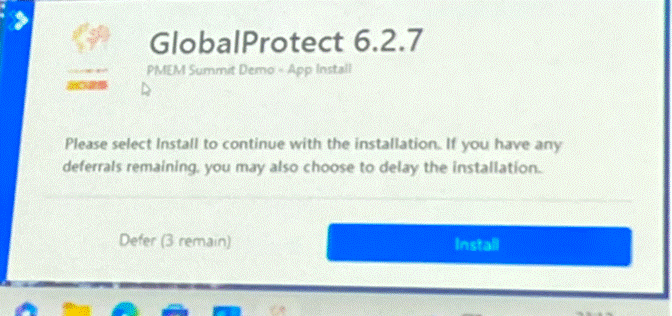
To get started, either download the kit from GitHub, or install from Powershell gallery via Visual Studio Code by using
Install-Module -Name PSAppDeployToolkit -Scope CurrentUserOnce there, you can then do
new-ADTTemplate -name AppName -dest “c:\deploy\app”. This command setups a blank template folder for the project.
You can then go ahead and create the code that you need to.
Once complete and ready to go, download the intuneutil tool from Microsoft and use the command line:
IntuneAppUtil.exe -c setupfolder -s Invoke-AppDeploytoolkit.exe -o OutputDirThen you can add to Intune, adding in all the usual information for the deployment.
Remember that PowerShell ISE is now deprecated and its recommended to use Visual Studio Code for Powershell coding.
For more information on Powershell App Deployment Toolkit, take a look at the getting started guide and I’ll even write a more specific blog post going into more detail.
Takeaways

So after two days of learning the ninja ways, and enjoying my time in Edinburgh, what are my key takeaways to come back with? The following list is not my complete sweet shop wish list, but things to look at in the short-term:
- Review Windows 365 Point in Time restore and increase the number of restore points to every 4 hours (provides 6 restore points)
- Look at Windows 365 switch primarily for IT admins to make it easier to switch from physical to Windows 365
- Review compliance policies to see if we can split them out. In particular, have a separate one for the Device attestion policies
- Review and update PowerShell App Deployment Toolkit from v3.10 to v4
- Look at adding devices into the RDP Multipath public preview
- Look into capabilities of Microsoft Defender around software metering
This is just the top 6 to look at, I have another page and a bit of takeaways to look at and prioritise. Some of it might just even make appearances here to share.
More content like this? Take a look at:






 Lilys Dad
Leave a comment