
Update 13 Jan 2025 22:21 GMT
So Microsoft has now confirmed that it is an issue:
Some users’ Microsoft 365 applications may be unexpectedly crashing on Windows Server 2016 and 2019 devices
Issue ID: MO978220
Affected services: Microsoft 365 suite
Status: Service degradation
Issue type: Advisory
Start time: Jan 13, 2025, 2:56 AM CSTUser impact
Users’ Microsoft 365 applications may be unexpectedly crashing on Windows Server 2016 and 2019 devices.More info
While we’re focused on mitigation, we recommend that affected customers roll back to Version 2411 (Build 18227.20162) by following the instructions outlined in this article: How to revert to an earlier version of Office – Microsoft Support.Scope of impact
Impact is specific to some users who are served through the affected infrastructure.Root cause
A recent Office update that integrates React Native framework to support certain features in Microsoft 365 applications has introduced a problem that’s leading to this impact.Current status
Jan 13, 2025, 2:00 PM CST
We’ve implemented a change to mitigate the impact for users on Windows Server 2016 devices, by reverting to version 2411, which isn’t affected, and we’re reaching out to some affected users to confirm that this resolves the problem. We’re determining if the same method can be used to mitigate the issue for users on Windows Server 2019 devices, or if another mitigation strategy is needed.
So its been a fun morning so far. one of our automations failed due to an Outlook crash. jumping onto the server we found that we had the following prompts appear
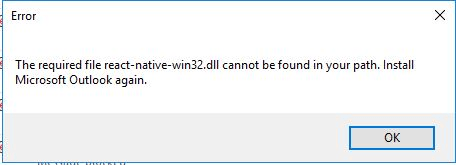
We first tried a quick repair – no luck there! Then tried a full online repair and that still failed with the same message.
Then we turned our attention to check OS health by running:
- DISM /online /cleanup-image /checkhealth
- DISM /online /cleanup-image /scanhealth
and then repairing health - DISM.exe /Online /Cleanup-image /RestoreHealth
- sfc /scannow
But even that still caused the issue to occur. Then a quick google-fu found this post from today over on SpiceWorks which suggested there has been an update which is not working. So we rolled back using the following on a Admin elevated command prompt
cd %programfiles%\Common Files\Microsoft Shared\ClickToRun
officec2rclient.exe /update user updatetoversion=16.0.18227.20152
Once rolled back Outlook (and Excel on other servers) started to work correctly again.
This seems to be linked to this Microsoft Service Health announcement in the Admin portal which states:
“Some users’ Microsoft 365 applications may be unexpectedly crashing on Windows Server 2016 devices”
Will update the post with any updates later.






 Lilys Dad
Leave a comment