
Improve the Intune policy refresh

As part of my continuing education and evolution into Intune, I have always struggled with what I call “Intune Time“. You know, that time that has an indefinite length of when Intune will actually do something useful.
Reading Reddit, like you do in the evenings, I came across a thread all about migrating from Active Directory / Group Policy / Config Manage – whats the most missed features… there was a response that pricked my eyes with a feature that seems to have snuck past me which is Config Refresh
Reading the link its a feature of Intune where you get to se the config refresh time to a length of time of your choosing be it every 30 minutes up to 24 hours. It will also allow you to pause the policy refreshes whilst you look to troubleshoot any issues with policies.
How To Setup
Note: This will only be supported on Windows 11 22H2 with the June 2024 security update applied.
Create a new Configuration Policy > Intune Settings Catalog and find Config Refresh. Enable the setting and then choose the cadence you require. This can be between 30 and 1,440 minutes.

How to check its applied?
Open the Registry and check the following key:
Computer\HKEY_Local_Machine\Software\Microsoft\Enrollments\<policy ID>\ConfigRefresh
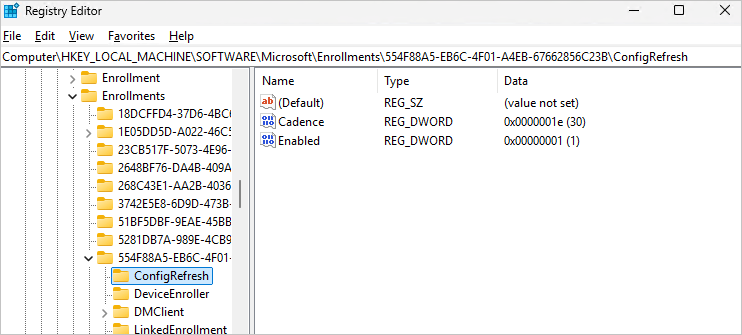
And you’ll also notice a new scheduled task on the device responsible for triggering the refresh under Microsoft/Windows/EnterpriseMgmtNonCritical node
Final Thoughts
Bare in mind, that its designed to work with MDM policise managed by the Policy CSP engine. Some other policies, notably Bitlocker, will also adhere to the settings in Config Refresh. Other policies will not be affected and these will be Firewall, AppLocker and LAPS.
Something we will try out and I’ll feedback in a months time!






 Lilys Dad
Leave a comment